
To audit a service-request queue in n8n, load one snapshot, validate the fields that drive your next action, and keep a report of every supplied row. Check duplicates before routing by ID, assignment before sending an owner a message, and dates before treating a request as overdue.
This free workflow turns six fictional requests into an inspectable audit and a downloadable CSV. It uses five standard n8n nodes, runs manually, and requires no AppStruct account, API credential or community package for the example. It does not send messages or update the source.
Try first: Review the six fictional requests in your browser, then adapt the exercise in n8n when you are ready.
Download the n8n workflow JSON. You can also inspect the example CSV before importing anything. All sample names, requests and IDs are fictional.
Try the request review in your browser
Start with the six fictional requests below. Run the review, inspect the four flagged rows, then apply the example corrections. Download either report and compare what changed. This uses the same audit function embedded in the n8n JSON; it runs locally in the page and does not execute n8n or connect an account.
Which requests need attention?
Run the review, inspect four problem rows, then try the corrections. No account or installation needed.
2026-11-20
REQ-001Replace the demo kiosk labelnew · Alex · 2026-11-21REQ-002Review the sample access requestin_progress · No owner · 2026-11-19REQ-003Close the practice onboarding taskdone · No owner · 2026-11-18REQ-004Check the fictional room displaynew · Mira · 2026-11-22REQ-004Check the fictional printer labelnew · Sam · 2026-11-22No IDNo request textwaiting · No owner · 2026-02-30
Runs locally with the same audit function embedded in the downloadable n8n workflow. This page does not run n8n or connect to AppStruct. All requests are fictional; passing these checks is not an approval to automate a real queue.
The corrections assign the overdue request and mark its fictional work complete, give the second duplicate a unique ID, and fill the last incomplete request. The original due date stays in the report. These example edits demonstrate the stated rules; completion of real work needs to be checked separately.
Run the included example
Use n8n's Import from File option to import the JSON into a new workflow. This example was tested on n8n 2.47.7; other versions have not been independently tested.
- Open Configure queue review. Keep the supplied data for your first run.
- Note the explicit
referenceDate, 2026-11-20. This is a reproducible example date, not a live clock. - Click Execute workflow. It is a manual workflow and is supplied with
active: false. - Open Audit service requests and inspect its
summaryandrecords. - Open Download review CSV, find its binary output and click Download.
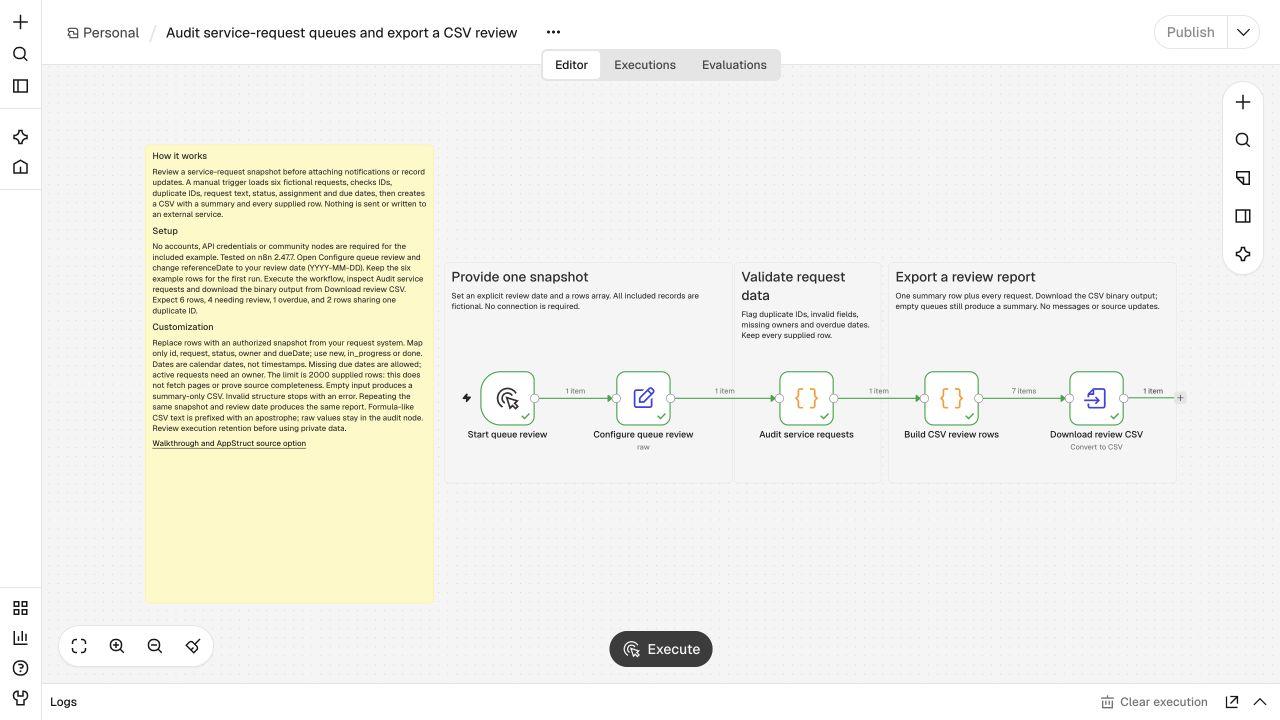
The CSV contains a header, one summary row and six request rows. Two matching IDs remain two separate rows. A green execution alone is insufficient: compare the report with these expected values.
| Check | Included example result |
|---|---|
| Supplied request rows | 6 |
| Rows needing review | 4 |
| Clean rows | 2 |
| Overdue active requests | 1 |
| Unassigned active requests | 1 |
| Rows sharing a duplicate ID | 2 |
| Distinct duplicate IDs | 1 |
REQ-002 is both overdue and unassigned. REQ-003 is done, so its past due date does not make it an overdue active request. Both REQ-004 rows are held for review. The last row has missing fields, an unknown status and an impossible February date.
Understand the checks before changing them
The audit uses an explicit policy rather than guessing your service agreement.
| Field or condition | Policy |
|---|---|
id | Nonempty trimmed string or safe integer; integers become strings |
| Duplicate ID | Flag every matching normalized ID; never discard a row |
request | Required text |
status | Exactly new, in_progress or done |
owner | Required for new and in_progress |
dueDate | Optional real calendar date in YYYY-MM-DD format |
| Overdue | Known active status and due date earlier than referenceDate |
| Unknown status or invalid date | Hold for review; do not infer an action |
Dates are calendar dates. A request due on the review date is not overdue under this policy. Timestamps, time zones, business hours and SLA calendars need a separate policy before adaptation.
An empty queue produces a summary-only CSV with zero rows. A missing rows array, a non-object record, an impossible review date or more than 2,000 supplied rows stops with an explicit error. The limit bounds this exercise; it is not evidence that your source has returned every page.
Replace the fictional queue with your own snapshot
The configuration node expects one object with this shape:
{
  "referenceDate": "2026-11-20",
  "rows": [
    {
      "id": "REQ-101",
      "request": "Review the practice access request",
      "status": "new",
      "owner": "Alex",
      "dueDate": "2026-11-21"
    }
  ]
}
Start with a small, authorized practice snapshot. Map source fields explicitly into id, request, status, owner and dueDate. Do not assume a field named title, a display label or a status translated into another language already matches this contract.
Change referenceDate for each review. If you later add a live source node, replace the example configuration with a mapping that produces one item containing the complete rows array. The audit reads the first input item; sending many individual items directly would review only the first. Verify pagination and count the source rows before trusting the summary.
Use AppStruct as an optional source
If your requests live in AppStruct App Builder, follow the AppStruct n8n connection guide. Verify a manual project read, select an authorized practice table, inspect the returned schema and rows, then map that output into the snapshot above. The downloadable workflow does not preselect an account, project or table.
AppStruct's n8n-nodes-appstruct 2.0.1 package requires self-hosted n8n 2.47.7+ and Node.js 24+. n8n approved the package on November 20, 2026; catalog rollout is scheduled, and availability will be checked after its separate release notification. The credential-free CSV example does not depend on that rollout. See the package source and compatibility notes.
Need the underlying form and saved records first? Use the service request app walkthrough. For detecting later source changes, the separate n8n polling exercise covers baselines and repeated reads. This report reviews a supplied snapshot; it does not detect new events.
Check the CSV and repeat the run
The CSV has a fixed set of columns. Unmapped extra source fields are excluded. Text starting like a spreadsheet formula is prefixed with an apostrophe in the report; the normalized audit values remain available in the previous node. CSV quoting preserves commas, quotes and line breaks.
Run the same snapshot and review date twice. The report should be identical, and neither execution changes your source. Then test an empty queue, a repeated ID and an invalid date before attaching a destination. Review the recommendations yourself: they are deterministic labels from the rules above, not an automated approval to message a customer or change a record.
Use the report to decide the next small correction, rerun it, and compare the affected row. If you later add notifications or writes, design authorization, retry handling and duplicate protection for those actions separately. Review n8n execution retention before supplying private records because input and output values can remain in execution history.