Cafe opening, closing & shift handover checklist
Give the next shift a clear place to find unfinished work. Start with six sample tasks, an owner role, a status and a handover note. Print one page for a shift, or use the editable CSV in a spreadsheet.
Your starter worksheet
Six fictional tasks. Every status starts as To do; handover notes are blank.
See a completed handover in AppStruct Sheets
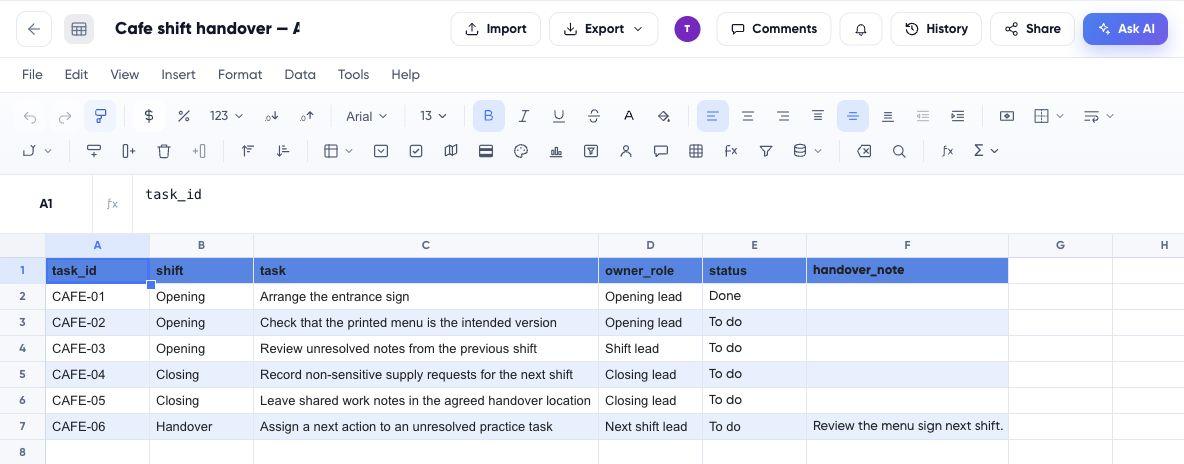
Open the read-only worked example without signing in: CAFE-01 is Done and CAFE-06 has a note for the next shift. Only the six teaching tasks are published.
View the completed Sheets exampleFictional practice data, not a customer case study. Use the starter files below to try the exercise yourself.
PDF: one US Letter page with completion boxes and space for notes. Choose Fit when printing on A4. CSV: editable rows for a spreadsheet.
No account or email required for the download or copy.
Manual copy option
| task id | shift | task | owner role | status | handover note |
|---|---|---|---|---|---|
| CAFE-01 | Opening | Arrange the entrance sign | Opening lead | To do | — |
| CAFE-02 | Opening | Check that the printed menu is the intended version | Opening lead | To do | — |
| CAFE-03 | Opening | Review unresolved notes from the previous shift | Shift lead | To do | — |
| CAFE-04 | Closing | Record non-sensitive supply requests for the next shift | Closing lead | To do | — |
| CAFE-05 | Closing | Leave shared work notes in the agreed handover location | Closing lead | To do | — |
| CAFE-06 | Handover | Assign a next action to an unresolved practice task | Next shift lead | To do | — |
AppStruct requires an account and applicable plan access. You can also use the CSV in another spreadsheet.
Try one small handover
- Download the CSV and import it into a spreadsheet, or copy the rows and paste at A1 in a blank sheet.
- Change CAFE-01 to Done. Add “Review the menu sign next shift.” to the handover note for CAFE-06.
- Wait for the saved state, reopen the workbook and check both changes. The other task statuses should remain To do.
The starter table and downloads keep their original tasks. The published Sheets example shows the completed exercise in a separate read-only view; editing your own copy does not change it.
How do I use this every day?
Add a business date and keep separate records or a new worksheet for each shift. Assign actual staff roles and replace the teaching tasks with the work your team owns. The CSV has no reminders or automatic daily reset.
Should this be a spreadsheet or an app?
A shared internal record is a useful starting point. Evaluate a separate app when staff need a tailored phone form, different permissions or a connection to another operational system. A handover sheet does not supply order processing, payments, stock accounting or food-safety procedures.
Read the small-business guide for the cafe example, product choice and a service-request app walkthrough.